MASTERCLASSES

Friday, 27 January 2012

Previewing Masterclass 41 at Multimedia Journalism: A Practical Guide


41A

With so much research done online, you need a way to organise the things you clip


As you research a story you’ll probably find things on websites, blogs, in PDFs, on Twitter, Facebook and other social platform

There may be YouTube videos, images, and audio.
And you’d like to group those elements, which will make up the background and reference points to what you write, all in one place.
As you’ll probably be doing some research on your computer, some on your smartphone and/or your tablet, you need what you find to be synchronised, whatever device you are on when you discover it.
If you are working collaboratively, you might also want to share the things you find with colleagues (co-workers).

Evernote Web Clipper

That’s where web-clipping software comes in. We’ll take a close look at Evernote Web Clipper, which is the market leader.
But what if your research is more academic? If you write on a scientific, medical or other journal and need to manage bibliographic data and related research materials (such as PDFs) you may need something more specialised that Evernote.
In which case Zotero might fit the bill.

Zotero

Zotero also has word processor plugins that allow you to insert citations and bibliographies directly into your documents.
We’ll have a run-through on Zotero – how to use it and what it can do for you.
And what about getting your best work gathered in a smart, elegant format online? Paper cuttings are inadequate, and running a list of links to your best stuff isn’t very impressive-looking either.

Cuttings Me

So how about Cuttings Me? It’s a great way to build up an online portfolio or clippings book of the journalism that you’ve produced.
It lets you put your best material, plus your profile and cv, on a smart web page that you can link to from wherever you like.

Next: Evernote Web Clipper

Up-coming tuition at MMJ (update)

Masterclass 41: Top 3 essential web-clipping apps for journalists

We take a look at three incredibly useful clipping apps - each of which is the best in its field for one key function. There's Evernote, a great research-gathering tool for news reporters; Zotero, perfect for more academic research and article composition; and Cuttings Me, an elegant way to put your best material together in a showcase of your talents.

Masterclass  42: How to use Google Creative Kit for photo-editing, plus some alternative apps to check out

When Google announced it would close Picnik, the popular photo-edtiting software company it bought a while back, there was outrage. Infact, what Google has done is bring Picnik into the Google+ fold, giving the good old Picnik functionality a re-skin.

We'll look at how to use it - hence updating the coverage of Picnik in the print veriosn of MMJ, and in the equivalent part of the ebook and online versions of the project.
We'll also take a look at three or four alternatives to Creative Kit/Picnik
Going live: February 4
Masterclass 43: Focus on print - plus: win your own print run
Print may be under pressure, but it's still core to what many journalists do. We'll take a look at the future of print, and at an interesting new venture called Make My Newspaper.
Make My Newspaper lets you create your own tabloid online, design it, add content and buy a short print run. It could be the answer for  journalism courses where creating a print product is an important learning tool and demonstration of competence. And it might work for hyperlocals that want a print presence.
We will offer two free print runs of 100, 20-page papers to lucky UK-based journalism courses, hyperlocals or start-ups.
Going live: February 11

Masterclass 44: Flash website building for non-coders

Flash websites are great for situations in which you want to make a visual impact, and where photography is important.
We'll look at a way to create a really professional one without knowing the first thing about coding.
Going live: February 18

Masterclass 45: Wordpress

Two levels of tuition in Wordpress. 
We’ll kick off by getting a basic site up and running. 
Then we'll look at using customised themes to create a really impressive Wordpress publishing platform.
March 10

Masterclass 46 - 49: How to choose a specialism, Series 2

We looked here at eight popular journalistic specialisms. Now we feature a second series, including:
  • Technology
  • Music
  • Education
March 24 - May 5

Masterclass 50: Brand Journalism

What it is, and why it could be the future for many journalists
May 19

Friday, 6 January 2012

This term's masterclasses from MMJ


A Happy New Year to all users of Multimedia Journalism: A Practical Guide


We're sorting out content up to Easter, so here's a run-down of planned topics. As ever, feel free to get in touch if there are things you'd like included in any of them, or other areas you'd like to see covered. 
A number of things in the list below were suggested by MMJ registered users, so thanks to them for taking the trouble to raise them.


Masterclass 41: Focus on print

Print may be under pressure, but it's still core to what many journalists do. We'll take a look at innovations in the medium, including Make My Newspaper.
Make My Newspaper lets you create your own tabloid online, design it, add content and buy a short print run. It could be the answer for  journalism courses where creating a print product is an important learning tool and demonstration of competence. And it might work for hyperlocals that want a print presence.
We hope to offer two free print runs of 100, 20-page papers to lucky UK-based journalism courses, hyperlocals or start-ups.
January 14, 2012

Masterclass 42: Focus on video

VeriLocal lets you record and edit video on an iPhone or other Apple mobile device, and upload it swiftly through a dedicated link to your own website.
VeriLocal scores on two counts - it's a much more sophisticated in-phone editing app than anything else on the market, and its dedicated upload facility means you avoid the perennial problem with other apps of a long time-lag on your video uploads.
Hopefully there'll be a number of free trials on offer for MMJ users from VeriLocal.
January 28 

Masterclass 43: What web-clipping app is best for journalists?

A range of competing apps road-tested and compared
February 11 2012

Masterclass 44: Flash website building for non-coders

February 25 

Masterclass 45: Getting started and building proficiency in Wordpress 

Two levels of tuition in Wordpress. We’ll kick off by getting a basic site up and running. 
Then we'll look at using customised themes to create a really impressive Wordpress publishing platform.
March 10

Masterclass 46 - 49: How to choose a specialism, Series 2

We looked here at eight popular journalistic specialisms. Now we feature a second series, including:
  • Technology
  • Music
  • Education
March 24 - May 5

Masterclass 50: Brand Journalism

What it is, and why it could be the future for many journalists
May 19

Thursday, 8 December 2011

Introducing: Brand Journalism, A Practical Guide to a New Medium

Here's something that worries me.

I try to help journalism students to acquire the skills they need to get jobs.

That's what the Multimedia Journalism project is all about.

But what worries me is that the number of jobs in what you might call traditional journalism is shrinking fast.
Pretty much every day there are reports of cutbacks and lay-offs by the traditional employers of journalists: publishers and broadcasters.

It's not that journalism skills aren't still in demand. Infact, many more people in a range of disciplines other than traditional journalism now need those skills.

That's because of the growth of social and other online media, and their use by marketers, public relations professionals, communicators and brand managers.

And because, as a result of the accessibility of social and online media, every company is a media company.

What is emerging is a new form of journalism - brand journalism. It requires all the traditional journalistic skills to do it well, but it also requires an understanding of marketing and PR.

Journalists have often seen PR as a dark art, and one that they would only move across to if their career in 'pure' journalism hit a brick wall.

They can't afford to think like that any more. And there is no need to see well-practised brand journalism as any lesser craft than the journalism required by publishers and broadcasters.

So I'm working on a new project.

Its working title is Brand Journalism: A Practical Guide to a New Medium.

It will be for those in all the disciplines mentioned above.

It will give journalism students and journalists the essential additional knowledge, understanding and practical skills they need in marketing, public relations, and communications.

And it will teach marketers, public relations and communications professionals, and brand managers what they need to learn about journalism.

It will take the form of a textbook - in both paper and ebook format - plus a comprehensive supporting website. And, as you'd expect, it'll also exploit the full range of social and mobile media.

As things develop, and the project takes shape, I'll post updates here. Meanwhile, and as a first step, I've begun to curate the topic of Brand Journalism on Scoop.it. You can find it here.

Friday, 25 November 2011

Instagram: it's Twitter for photojournalists... previewing Masterclass 40 at MMJ


40D

Instagram is a great iPhone social platform for photojournalists

It's like a visual version of Twitter

Like Twitter it does one thing really well. It lets you enhance and publish your stills to a community.
You follow people, hopefully they follow you, and you – and they – can comment on each others photos, and click to like them.
We looked at Instagram as one of the six smartphone apps featured here that I think are among the best on the market for journalism
The app itself is purely mobile based, so you can’t use it on a static computer.
However, like any successful social platform, apps are being created that stretch its usability
Let’s take a look at four of them, in no particular order. They’re new, and still under development, but they are worth checking out:

Instagrid

Instagrid creates an Instagram gallery on your computer that you can use to browse your photos and share them with  friends outside the Instagram community.
I can view as a grid or as a blog-style list
To get started you go here and enter your Instagram account name
It brings up your recently posted Instagram images. Here are mine:

You get your own url at Instagrid. Here’s mine: http://instagrid.me/andybull
The app expands the reach of Instagrid, the purely iPhone-centric app, by allowing you to invite people who don't use Instagram to subscribe to your feed via email.
I can also subscribe to the photographers whose work I like, and receive their new Instagram photos in an email every few days.
You can also create #hashtag galleries.
They say: “Instantly create a gallery of all the photos tagged with a specific #hashtag. It's a great way to keep track of a set of photos for yourself, your company, a conference or event.”
Now if I’d been careful to tag my recent photos from one or two of the locations I’ve shot I could create a good personal gallery. Sadly I wasn’t, but here’s what I got with the hashtag London:

One problem with this is that, if I have tagged my photos and want to use only them in my gallery, any other photos on Instagram tagged with the same hastag will be pulled in among mine. Instagrid tell me they are working on a filter so you can avoid this happening.
People can subscribe to my Instagrid channel if they wish. I can subscribe to as many uses as I like and get their images combined in a weekly newsletter
Here are some Instagram follows Instagrid recommends:
mikeyk founder of instagram

fashion street fashion, instagram style

nettatheninja got a job @square after posting this viral website

photojojo purveyor of camera culture

laughingsquid internet man, blogger Scott Beale

hellomuller designer of substance

dcurtis also a designer of substance

erickschonfeld writer for techcruch

threadless behind the scenes at the famous tshirt company
They also have a printing service for your pix here.

Inkstagram


Inkstagram does what Instagrid does but, in my opinion, with a better looking interface. You log in through Instagram.
Here’s a grab of my Instagram feed as presented by Instagrid:

I get my photos presented at about twice the size they appear on my phone

I can see either my feed, my own photos, photos I’ve liked, and other options by clicking on the tabs along the top of the screen.
I can also create, customise and share hashtag albums from Instagram.
Heres one #occupylondon:

You get a url, but not a neat one using your account name. Here’s mine: http://inkstagram.com/#/users/2214714
You do, however, get a nicely-designed presence on the site. Here’s mine:


Statigram

Statigram also offers you a good browser-based interface, in which you can choose to view your Instagram feed, your own phones, those you've liked, popular posts, and pix from those you follow, or who follow you.
As the name suggests, it's also keen on statistics.
You get a neat public url. Here's mine: http://statigr.am/andybull
Here's my feed:


Statigram is different in that it gives you stats on your pictures - which are the most popular, the most commented on, and so on, which makes it the most comprehensive of the four apps we're looking at:

The 'like' history, which gives you a graph that shows immediately which were the msot popular pictures and when they were taken, is really useful.
It also offers what it calls snapshots, well-presented graphics of various aspects of your life on Instagram that you can share with your instagram community.
Here's one that gives my three most popular pix:

I email those to myself from the app, then upload them into my Instagram feed. I can even put the filter of my choice on them.

Snapwidet  

Snapwidget is different from the three apps we've looked at so far because it lets you embed an Instagram photo gallery for a specific username or a hashtag on your blog or website.
They say: “It's easy. Simply fill in your username or hashtag and configure the styling options on the right.
“Then click PREVIEW to see what the widget will look like and GET CODE to get the snippet that you need to paste into your website.
You can preview what your gallery will look like:


And get the code to paste your gallery into your website:


Here’s what the embedded gallery looks like:

Next: Check out the rest of Masterclass 40

Friday, 11 November 2011

How to build a Google+ page for your journalism


39E

This post is a preview of Masterclass 39: Building proficiency with Google+

You can find the full masterclass here
The Google+ page feature is fresh out of the box
It’s only been possible for a few days to create a professional presence on Google+
Facebook’s Mark Zuckerberg immediately charactarised it as a Facebook-inspired mini-me.
There’s some truth in what he says.
But what we need to decide is whether Google+ pages enhance the platform for journalism.
And they most certainly do.
It’s dead easy to set up a Google+ page for your journalism. So what’s to lose?
If the platform tanks, you wasted 15 minutes. If it succeeds – and I think it has to – you are in at the start of a great new social mechanism.
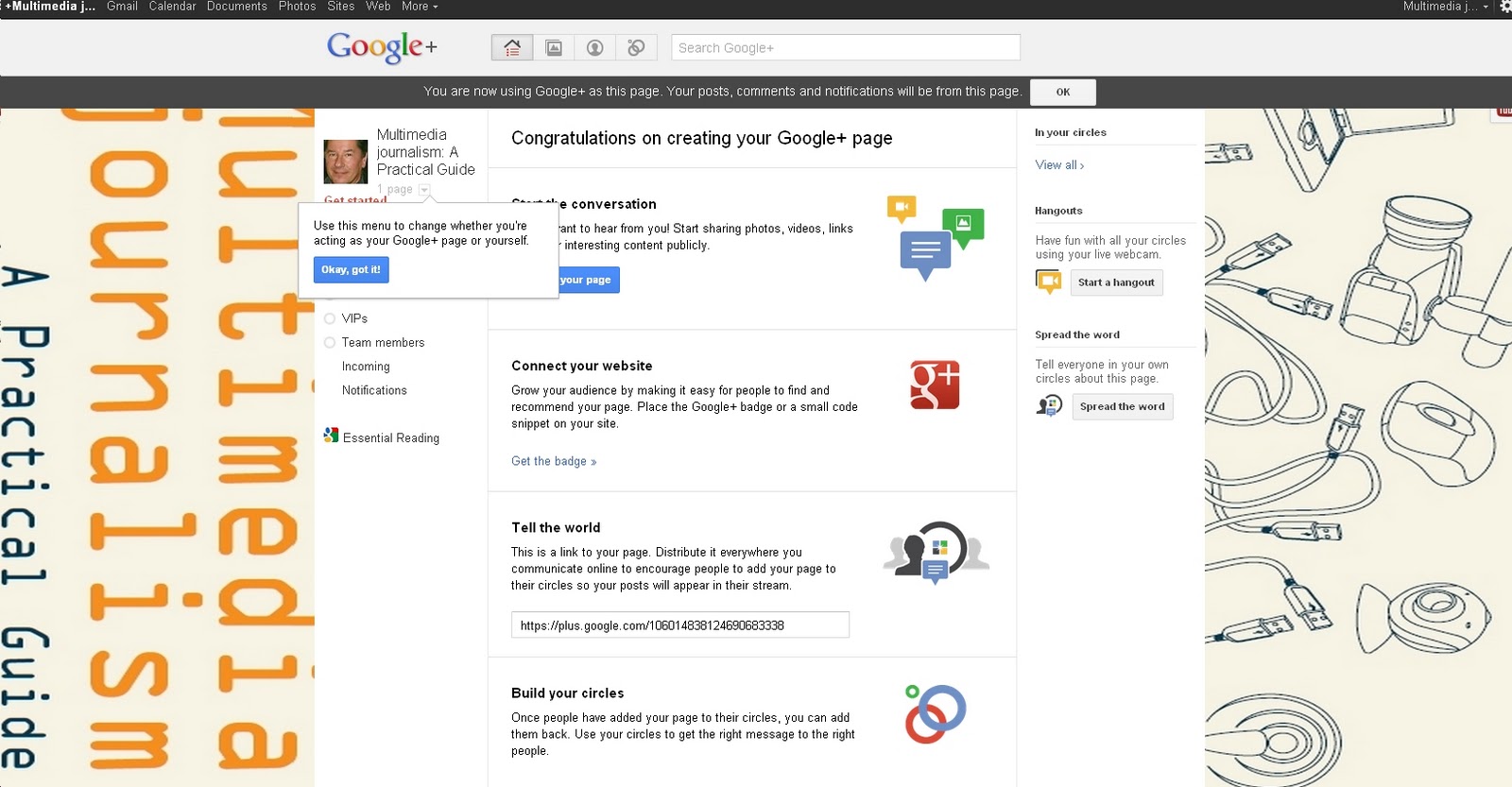
So here is a step-by-step guide to creating your Google+ page.
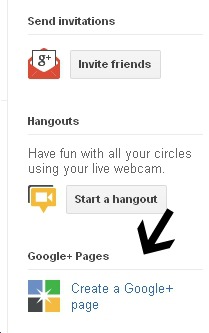
First, click the logo whcih I've arrowed on the right side of your page:

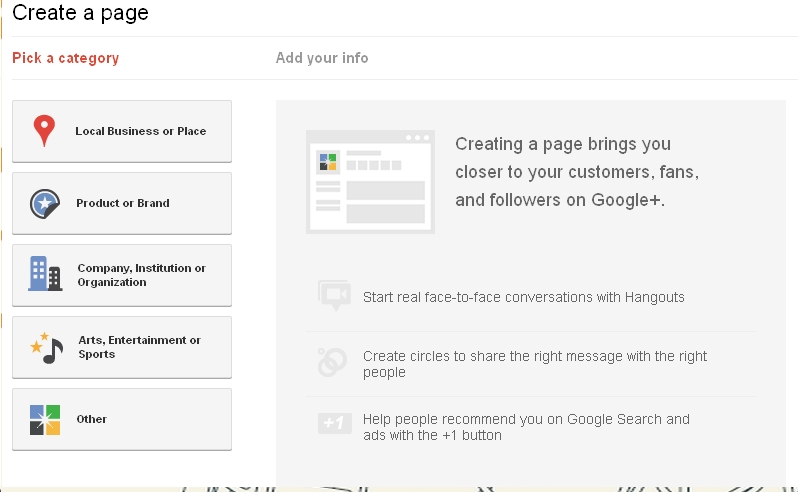
Select the category (you have to decide whether you and/or your journalism fits best under such headingss as product, brand or company:

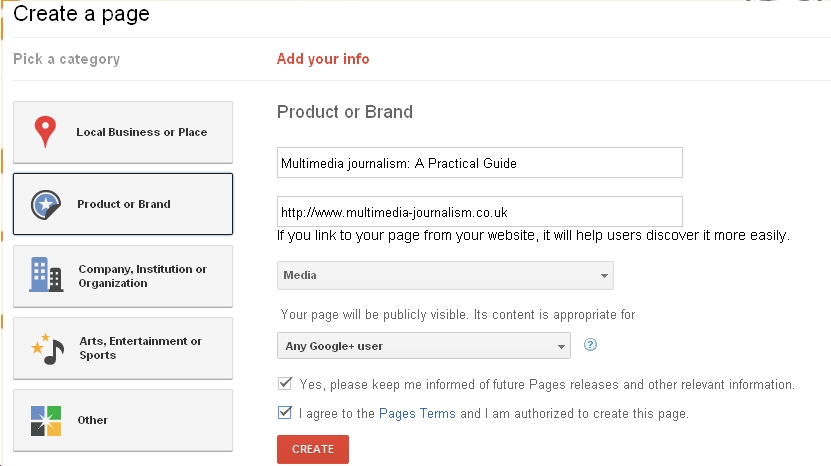
Add your info. You can link to your website at this point:

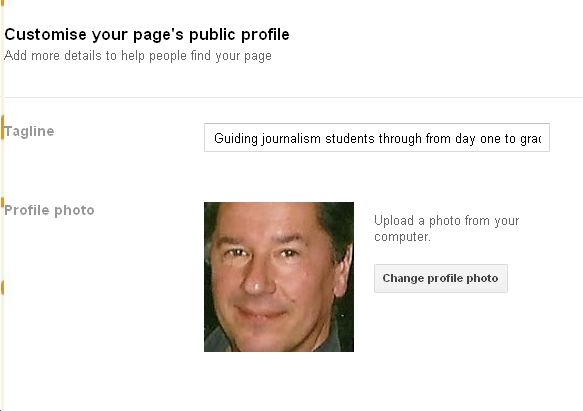
Once some whirring has taken place, you can add a tag line and a profile picture (see this module for how to customise your profile picture):

You get taken back to your page and you have this:

Here you can add information, promote and switch between using Google+ as yourself or as your page.
One thing to make clear: you now have two ways of using Google+ - as yourself or as your page - just as with Facebook you have your news feed and your page.
If you followed Masterclass 38 on building proficiency with Facebook, all of this will feel very familiar.
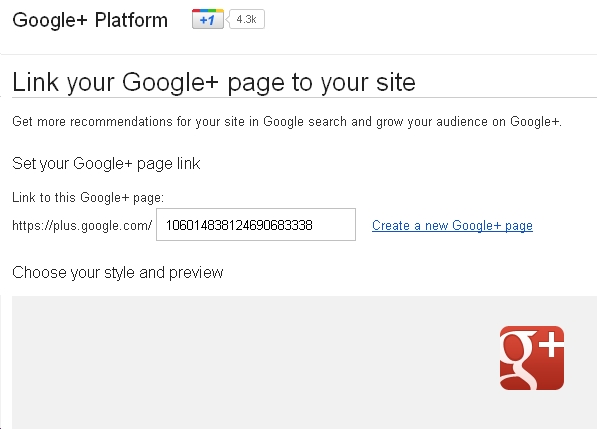
You can add a logo to your website to show you have a Google+ page:

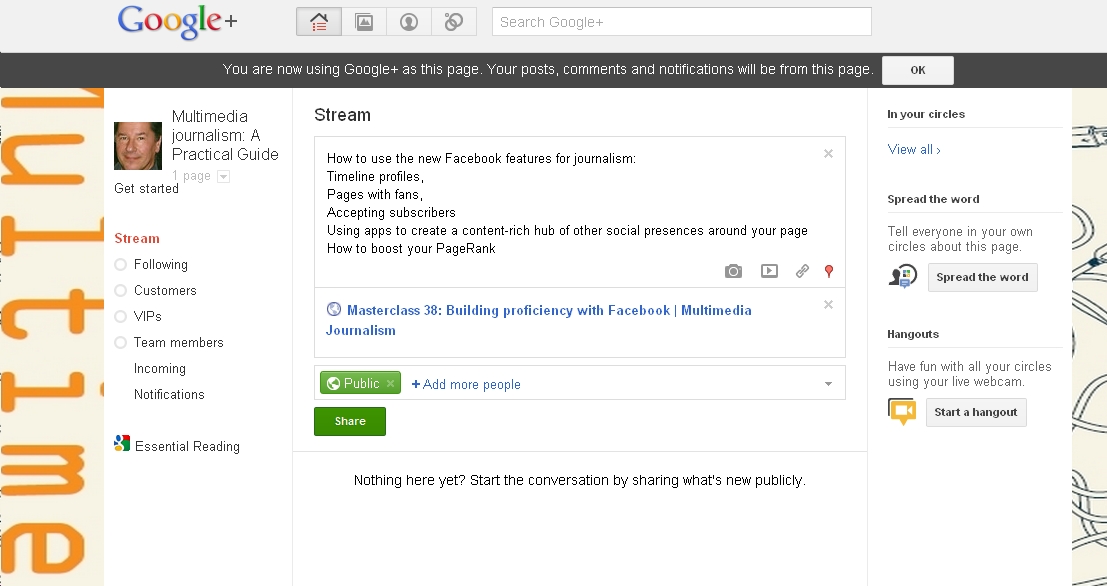
Add a post:

On the right is Share the word, .. where you can tell everyone in your circles about your new page.
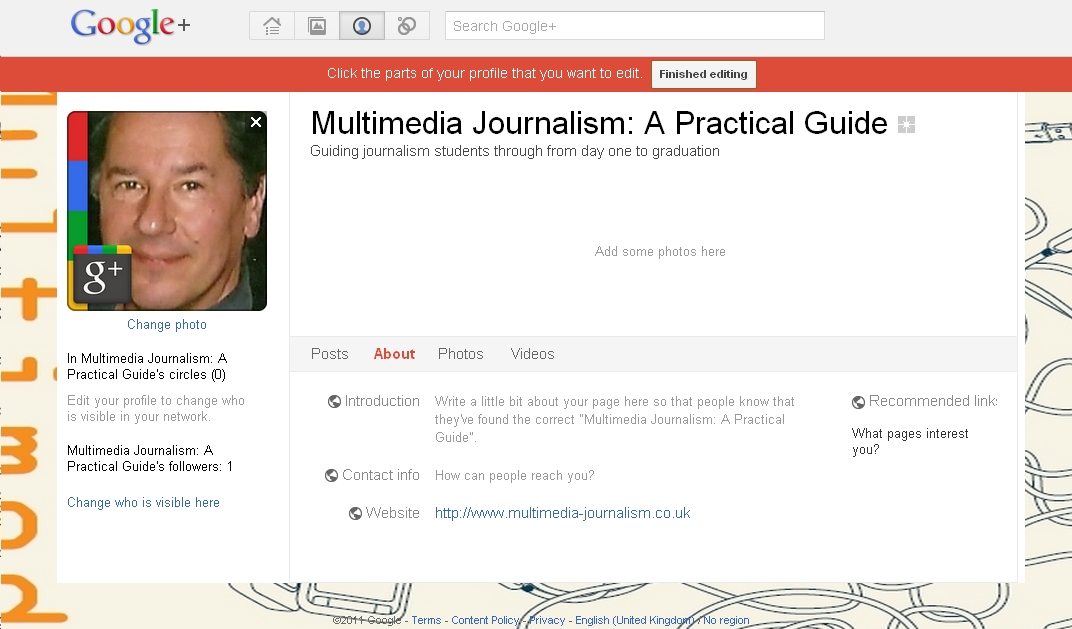
Then you get to pimp your profile here:

You can add text about what you do, photos and videos.
So you end up with a presence that has text about you, to which you can add photos and videos:

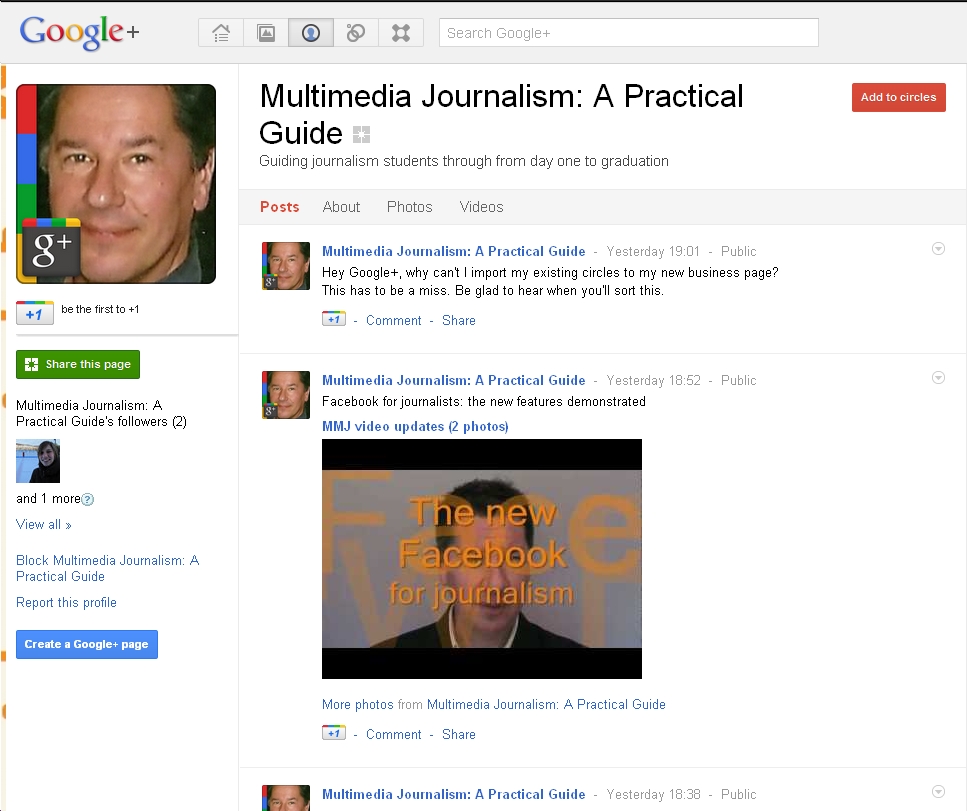
One frustration is that you don’t automatically have your existing circles added to your new page. This is such a miss that it must be sorted very soon. I’ll update here when it is.
Another is that using Google+ as yourself, and as you page, feel like entirely separate entities. Again, I'm sure sharing posts between the two will quickly be made easier, and I'll update here when it does.

For more on using Google+ for journalism, go here

Friday, 4 November 2011

Is Google+ deader than the digital-Dodo, or a rival to Twitter and Facebook?


The jury’s still out on Google+

Will it become the essential third social platform for journalism, alongside Twitter and Facebook?

Or will it fade, as previous, much-trumpeted Google features such as Buzz and Wave have done?

My hunch is it’s going to end up lagging third in the rank of usefulness to journalists for at least a year.

But I could be wrong. 

It may tank. 

When I checked how many of the 724 people in my circles were inactive, using the Uncircle+ app, almost a third hadn’t posted for a month.

That doesn’t look good.

So why bother with it?

Well, because I can’t see Google letting it die without a very hard fight.

Google+ is being positioned at the heart of Google’s operations. 

Google is integrating all other applications with it, in an effort to make it the essential social web-home where all is available.

Google has plenty of other apps it can integrate with it.

Reader has now been integrated, so that you can add any of the items you gathered in the Reader, from the RSS feeds we looked at in this Masterclass to your feed, and share them with your circles.

YouTube, which Google also owns, now appears as a tab to the right of your screen. Click on it and you’re asked: What do you want to play? 

Add a search term and you get a pop-up with relevant videos, plus a box asking what you’d like to play next.

And you can share the videos you watch with those in your Circles.

So, you can stay here for YouTube as well as Reader.

It follows, then, that Google+ is not just a social network: it is an effort to create a backbone for all Google services - and the full implications of that are only just becoming obvious.

As Adam Tinworth pointed out when I posted about inactive accounts on Google+: “People forget that in the early days of Twitter people would sign up and let their accounts go fallow for months. This is normal for the early stages of a new social service…”

For that reason, I believe it’s worth building our proficiency with it.

I’ll be posting a full masterclass on enhancing your use of Google+ for journalism soon. Check here for updates.